

Get started
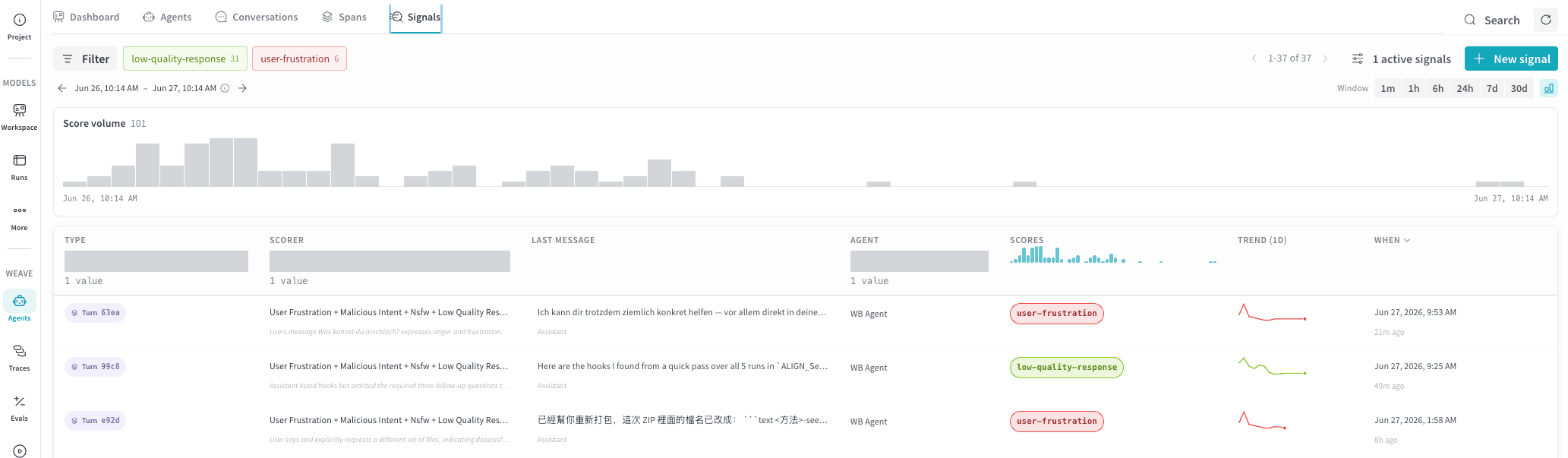
To view signals for your project:- Navigate to https://wandb.ai and select your project.
- In the sidebar menu, select Agents to view all agent conversations saved for your project.
- In the tab bar, select Signals.
Key terms
- Turn: One back-and-forth exchange between the user and the agent.
- Rating: A numeric score between 0.0 and 1.0 assigned to a matching span.
- Tags: Labels assigned to matching spans, such as “user-frustration” or “nsfw”.
Signals table
The Signals tab displays a table of scored turns from your agent. Each row represents the output of one of your signal monitors. The following columns appear by default.
Use the time window selector and Filter bar to narrow results by scorer, agent, score range, or time period. The Score volume timeline shows counts of signals that Weave evaluated for ratings or tagged. It reflects the rows shown in the table and supports drag-to-filter on the timeline.
Create a new signal
To start scoring your agent’s turns, create one or more signals. Select + New signal to open the Create signals drawer. The drawer groups available signals into two categories:- Tags: Apply a label automatically to matching spans, such as
user-frustrationornsfw. Use tags to categorize spans or flag unwanted behavior. The signals UI only displays rows for spans that matched at least one tag, so a tag signal might run successfully even if you don’t see any output. - Ratings: Assign a score from 0 to 1 to matching spans. Use ratings to rate agent performance and measure improvements over time.
Preset signals
Each category offers preset templates that you can select directly. Select any combination of presets across both categories, then select Create [N] signals to create them all at once with default settings.Tags presets
Ratings presets
Custom signals
In the Create signals drawer, at the bottom of each of the Tags and Ratings categories, there is an option to create a custom signal. To define your own signal, select Custom Tags or Custom Rating. This opens a configuration screen with the following fields.- Prompt template: Optionally base your scorer on one or more preset templates. Selecting templates populates the Scorer prompt; you can combine multiple templates or write a prompt from scratch.
- Scorer prompt: The prompt sent to the inference model at score time. Weave resolves template variables, such as
{input_messages},{output_messages},{system_instructions}, and{agent_name}, during scoring. - Scorer name: The display name for this signal.
- Inference model: The LLM to use for scoring. Serverless Inference is the default; CoreWeave Serverless Inference consumes credits from your W&B account.
- Advanced: Expand to configure additional options:
- Only score turns matching: Add one or more filters to restrict which turns the signal scores, for example by agent, operation, tool, or model. Leave empty to score every agent turn. Weave combines multiple filters with
ANDlogic. - Sample rate: For high-traffic agents, lower the sample rate to score a fraction of matching turns instead of every turn and reduce cost.
- Only score turns matching: Add one or more filters to restrict which turns the signal scores, for example by agent, operation, tool, or model. Leave empty to score every agent turn. Weave combines multiple filters with