> ## Documentation Index
> Fetch the complete documentation index at: https://wb-21fd5541-dbrian-docs-serverless-training-quickstart.mintlify.site/llms.txt
> Use this file to discover all available pages before exploring further.
# Anthropic
> Use Weave to automatically track and log LLM calls made with the Anthropic SDK
 When you integrate Weave into your code, it automatically tracks and logs LLM calls made with the Anthropic SDK for both [Python](https://github.com/anthropics/anthropic-sdk-python) and [TypeScript](https://github.com/anthropics/anthropic-sdk-typescript). Weave does this by automatically invoking Anthropic's `Messages.create()` method.
This guide shows you how to capture traces, wrap your own functions as ops, build a reusable `Model` for experimentation, and track tool use when working with the Anthropic SDK. Use these patterns to debug, compare, and iterate on Claude-powered applications without writing custom logging code.
## Traces
Weave automatically captures traces for the Anthropic SDK when you add `weave.init("your-team-name/your-project-name")` to your code. If you don't specify a team name as an argument in `weave.init()`, Weave logs output to your [default W\&B entity](/platform/app/settings-page/user-settings/#default-team). If you don't specify a project name, Weave fails to initialize.
The following examples demonstrate how to integrate Weave into a basic call to Anthropic:
```python lines {6} theme={null}
import weave
# use the anthropic library as usual
import os
from anthropic import Anthropic
weave.init("anthropic_project")
client = Anthropic(
api_key=os.environ.get("ANTHROPIC_API_KEY"),
)
message = client.messages.create(
max_tokens=1024,
messages=[
{
"role": "user",
"content": "Tell me a joke about a dog",
}
],
model="claude-3-opus-20240229",
)
print(message.content)
```
```typescript twoslash theme={null}
// @noErrors
import Anthropic from '@anthropic-ai/sdk';
import * as weave from 'weave';
import { wrapAnthropic } from 'weave';
await weave.init('anthropic_project');
// Wrap the Anthropic client to enable tracing
const client = wrapAnthropic(new Anthropic());
const message = await client.messages.create({
max_tokens: 1024,
messages: [
{
role: 'user',
content: 'Tell me a joke about a dog',
}
],
model: 'claude-3-opus-20240229',
});
console.log(message.content);
```
By including `weave.init()` in the code, Weave automatically captures tracing information and outputs links. You can view the traces in the Weave UI by clicking on the links.
[
When you integrate Weave into your code, it automatically tracks and logs LLM calls made with the Anthropic SDK for both [Python](https://github.com/anthropics/anthropic-sdk-python) and [TypeScript](https://github.com/anthropics/anthropic-sdk-typescript). Weave does this by automatically invoking Anthropic's `Messages.create()` method.
This guide shows you how to capture traces, wrap your own functions as ops, build a reusable `Model` for experimentation, and track tool use when working with the Anthropic SDK. Use these patterns to debug, compare, and iterate on Claude-powered applications without writing custom logging code.
## Traces
Weave automatically captures traces for the Anthropic SDK when you add `weave.init("your-team-name/your-project-name")` to your code. If you don't specify a team name as an argument in `weave.init()`, Weave logs output to your [default W\&B entity](/platform/app/settings-page/user-settings/#default-team). If you don't specify a project name, Weave fails to initialize.
The following examples demonstrate how to integrate Weave into a basic call to Anthropic:
```python lines {6} theme={null}
import weave
# use the anthropic library as usual
import os
from anthropic import Anthropic
weave.init("anthropic_project")
client = Anthropic(
api_key=os.environ.get("ANTHROPIC_API_KEY"),
)
message = client.messages.create(
max_tokens=1024,
messages=[
{
"role": "user",
"content": "Tell me a joke about a dog",
}
],
model="claude-3-opus-20240229",
)
print(message.content)
```
```typescript twoslash theme={null}
// @noErrors
import Anthropic from '@anthropic-ai/sdk';
import * as weave from 'weave';
import { wrapAnthropic } from 'weave';
await weave.init('anthropic_project');
// Wrap the Anthropic client to enable tracing
const client = wrapAnthropic(new Anthropic());
const message = await client.messages.create({
max_tokens: 1024,
messages: [
{
role: 'user',
content: 'Tell me a joke about a dog',
}
],
model: 'claude-3-opus-20240229',
});
console.log(message.content);
```
By including `weave.init()` in the code, Weave automatically captures tracing information and outputs links. You can view the traces in the Weave UI by clicking on the links.
[ ](https://wandb.ai/capecape/anthropic_project/weave/calls)
## Wrap with your own ops
While `weave.init()` alone captures Anthropic SDK calls, decorating your own functions with ops gives you richer traces that include your application logic around each model call.
Weave ops automatically version your code as you experiment, and capture its inputs and outputs. Decorate a function with [`@weave.op()`](https://docs.wandb.ai/weave/guides/tracking/ops) in Python or wrap it with [`weave.op()`](/weave/reference/typescript-sdk/functions/op) in TypeScript to call [`Anthropic.messages.create()`](https://platform.claude.com/docs/en/build-with-claude/working-with-messages), and Weave tracks the inputs and outputs for you.
The following examples show you how to track a function:
```python lines {5,10,24} theme={null}
import weave
import os
from anthropic import Anthropic
weave.init("anthropic_project")
client = Anthropic(
api_key=os.environ.get("ANTHROPIC_API_KEY"),
)
@weave.op()
def call_anthropic(user_input:str, model:str) -> str:
message = client.messages.create(
max_tokens=1024,
messages=[
{
"role": "user",
"content": user_input,
}
],
model=model,
)
return message.content[0].text
@weave.op()
def generate_joke(topic: str) -> str:
return call_anthropic(f"Tell me a joke about {topic}", model="claude-3-haiku-20240307")
print(generate_joke("chickens"))
print(generate_joke("cars"))
```
```typescript twoslash theme={null}
// @noErrors
import Anthropic from '@anthropic-ai/sdk';
import * as weave from 'weave';
import { wrapAnthropic } from 'weave';
await weave.init('anthropic_project');
const client = wrapAnthropic(new Anthropic());
const callAnthropic = weave.op(async function callAnthropic(
userInput: string,
model: string
): Promise {
const message = await client.messages.create({
max_tokens: 1024,
messages: [
{
role: 'user',
content: userInput,
}
],
model: model,
});
const content = message.content[0];
return content.type === 'text' ? content.text : '';
});
const generateJoke = weave.op(async function generateJoke(
topic: string
): Promise {
return callAnthropic(`Tell me a joke about ${topic}`, 'claude-3-haiku-20240307');
});
console.log(await generateJoke('chickens'));
console.log(await generateJoke('cars'));
```
When you decorate a function with `weave.op()`, Weave captures the function's code, input, and output. You can use ops to track any function you want, including nested functions.
[
](https://wandb.ai/capecape/anthropic_project/weave/calls)
## Wrap with your own ops
While `weave.init()` alone captures Anthropic SDK calls, decorating your own functions with ops gives you richer traces that include your application logic around each model call.
Weave ops automatically version your code as you experiment, and capture its inputs and outputs. Decorate a function with [`@weave.op()`](https://docs.wandb.ai/weave/guides/tracking/ops) in Python or wrap it with [`weave.op()`](/weave/reference/typescript-sdk/functions/op) in TypeScript to call [`Anthropic.messages.create()`](https://platform.claude.com/docs/en/build-with-claude/working-with-messages), and Weave tracks the inputs and outputs for you.
The following examples show you how to track a function:
```python lines {5,10,24} theme={null}
import weave
import os
from anthropic import Anthropic
weave.init("anthropic_project")
client = Anthropic(
api_key=os.environ.get("ANTHROPIC_API_KEY"),
)
@weave.op()
def call_anthropic(user_input:str, model:str) -> str:
message = client.messages.create(
max_tokens=1024,
messages=[
{
"role": "user",
"content": user_input,
}
],
model=model,
)
return message.content[0].text
@weave.op()
def generate_joke(topic: str) -> str:
return call_anthropic(f"Tell me a joke about {topic}", model="claude-3-haiku-20240307")
print(generate_joke("chickens"))
print(generate_joke("cars"))
```
```typescript twoslash theme={null}
// @noErrors
import Anthropic from '@anthropic-ai/sdk';
import * as weave from 'weave';
import { wrapAnthropic } from 'weave';
await weave.init('anthropic_project');
const client = wrapAnthropic(new Anthropic());
const callAnthropic = weave.op(async function callAnthropic(
userInput: string,
model: string
): Promise {
const message = await client.messages.create({
max_tokens: 1024,
messages: [
{
role: 'user',
content: userInput,
}
],
model: model,
});
const content = message.content[0];
return content.type === 'text' ? content.text : '';
});
const generateJoke = weave.op(async function generateJoke(
topic: string
): Promise {
return callAnthropic(`Tell me a joke about ${topic}`, 'claude-3-haiku-20240307');
});
console.log(await generateJoke('chickens'));
console.log(await generateJoke('cars'));
```
When you decorate a function with `weave.op()`, Weave captures the function's code, input, and output. You can use ops to track any function you want, including nested functions.
[ ](https://docs.wandb.ai/weave/guides/tracking/ops)
## Create a `Model` for easier experimentation
Once you're tracing individual calls, the next step is to organize related parameters together so you can compare different configurations.
The `weave.Model` class is only available in the Weave Python SDK. For TypeScript, use the `weave.op()` wrapper to track functions with structured parameters.
Organizing experimentation is difficult when many pieces are moving. By using the [`Model`](/weave/guides/core-types/models) class, you can capture and organize the experimental details of your app like your system prompt or the model you're using. This helps you organize and compare different iterations of your app.
In addition to versioning code and capturing inputs and outputs, models capture structured parameters that control your application's behavior. This can help you find which parameters work best. You can also use Weave models with `serve` and [evaluations](/weave/guides/core-types/evaluations).
In the following example, you can experiment with `model` and `temperature`:
```python lines theme={null}
import weave
# use the anthropic library as usual
import os
from anthropic import Anthropic
weave.init('joker-anthropic')
class JokerModel(weave.Model): # Change to `weave.Model`
model: str
temperature: float
@weave.op()
def predict(self, topic): # Change to `predict`
client = Anthropic()
message = client.messages.create(
max_tokens=1024,
messages=[
{
"role": "user",
"content": f"Tell me a joke about {topic}",
}
],
model=self.model,
temperature=self.temperature
)
return message.content[0].text
joker = JokerModel(
model="claude-3-haiku-20240307",
temperature = 0.1)
result = joker.predict("Chickens and Robots")
print(result)
```
Every time you change one of these values, Weave creates and tracks a new version of `JokerModel`. This lets you associate trace data with your code changes and can help you determine which configurations work best for your use case.
[
](https://docs.wandb.ai/weave/guides/tracking/ops)
## Create a `Model` for easier experimentation
Once you're tracing individual calls, the next step is to organize related parameters together so you can compare different configurations.
The `weave.Model` class is only available in the Weave Python SDK. For TypeScript, use the `weave.op()` wrapper to track functions with structured parameters.
Organizing experimentation is difficult when many pieces are moving. By using the [`Model`](/weave/guides/core-types/models) class, you can capture and organize the experimental details of your app like your system prompt or the model you're using. This helps you organize and compare different iterations of your app.
In addition to versioning code and capturing inputs and outputs, models capture structured parameters that control your application's behavior. This can help you find which parameters work best. You can also use Weave models with `serve` and [evaluations](/weave/guides/core-types/evaluations).
In the following example, you can experiment with `model` and `temperature`:
```python lines theme={null}
import weave
# use the anthropic library as usual
import os
from anthropic import Anthropic
weave.init('joker-anthropic')
class JokerModel(weave.Model): # Change to `weave.Model`
model: str
temperature: float
@weave.op()
def predict(self, topic): # Change to `predict`
client = Anthropic()
message = client.messages.create(
max_tokens=1024,
messages=[
{
"role": "user",
"content": f"Tell me a joke about {topic}",
}
],
model=self.model,
temperature=self.temperature
)
return message.content[0].text
joker = JokerModel(
model="claude-3-haiku-20240307",
temperature = 0.1)
result = joker.predict("Chickens and Robots")
print(result)
```
Every time you change one of these values, Weave creates and tracks a new version of `JokerModel`. This lets you associate trace data with your code changes and can help you determine which configurations work best for your use case.
[ ](https://wandb.ai/capecape/anthropic_project/weave/calls)
## Tools (function calling)
In addition to standard messages, Weave instruments Anthropic's tool use interface so you can trace agentic workflows end-to-end.
Anthropic provides a [tools](https://platform.claude.com/docs/en/agents-and-tools/tool-use/overview) interface that lets Claude request function calls. Weave automatically tracks tool definitions, tool use requests, and tool results throughout the conversation.
The following truncated examples demonstrate an Anthropic tool configuration:
```python lines theme={null}
message = client.messages.create(
max_tokens=1024,
messages=[
{
"role": "user",
"content": "What's the weather like in San Francisco?",
}
],
tools=[
{
"name": "get_weather",
"description": "Get the current weather in a given location",
"input_schema": {
"type": "object",
"properties": {
"location": {
"type": "string",
"description": "The city and state, e.g. San Francisco, CA",
}
},
"required": ["location"],
},
},
],
model=model,
)
print(message)
```
```typescript twoslash theme={null}
// @noErrors
const message = await client.messages.create({
max_tokens: 1024,
messages: [
{
role: 'user',
content: "What's the weather like in San Francisco?",
}
],
tools: [
{
name: 'get_weather',
description: 'Get the current weather in a given location',
input_schema: {
type: 'object',
properties: {
location: {
type: 'string',
description: 'The city and state, e.g. San Francisco, CA',
}
},
required: ['location'],
},
},
],
model: 'claude-3-opus-20240229',
});
console.log(message);
```
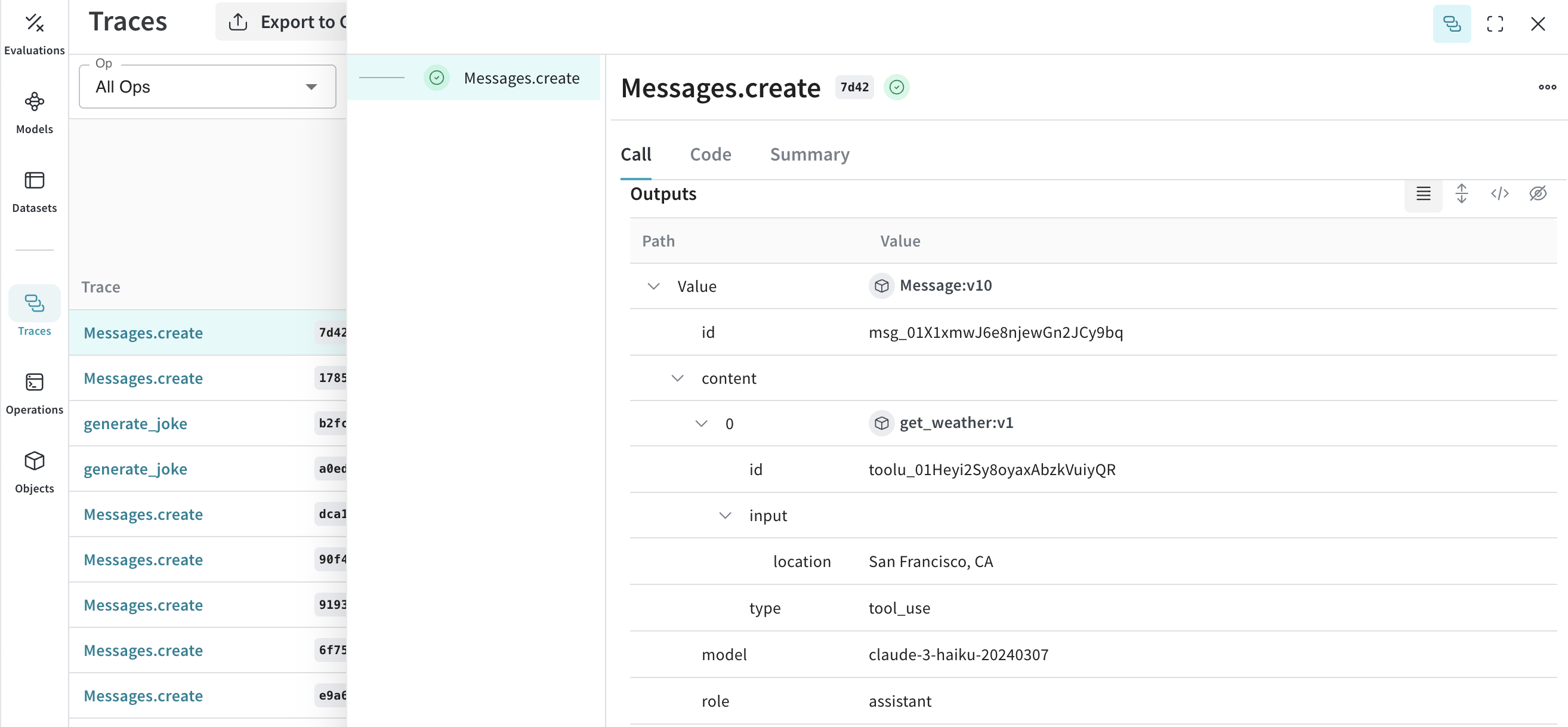
Weave automatically captures the tool definitions, Claude's tool use requests, and tool results at each step of the conversation.
[
](https://wandb.ai/capecape/anthropic_project/weave/calls)
## Tools (function calling)
In addition to standard messages, Weave instruments Anthropic's tool use interface so you can trace agentic workflows end-to-end.
Anthropic provides a [tools](https://platform.claude.com/docs/en/agents-and-tools/tool-use/overview) interface that lets Claude request function calls. Weave automatically tracks tool definitions, tool use requests, and tool results throughout the conversation.
The following truncated examples demonstrate an Anthropic tool configuration:
```python lines theme={null}
message = client.messages.create(
max_tokens=1024,
messages=[
{
"role": "user",
"content": "What's the weather like in San Francisco?",
}
],
tools=[
{
"name": "get_weather",
"description": "Get the current weather in a given location",
"input_schema": {
"type": "object",
"properties": {
"location": {
"type": "string",
"description": "The city and state, e.g. San Francisco, CA",
}
},
"required": ["location"],
},
},
],
model=model,
)
print(message)
```
```typescript twoslash theme={null}
// @noErrors
const message = await client.messages.create({
max_tokens: 1024,
messages: [
{
role: 'user',
content: "What's the weather like in San Francisco?",
}
],
tools: [
{
name: 'get_weather',
description: 'Get the current weather in a given location',
input_schema: {
type: 'object',
properties: {
location: {
type: 'string',
description: 'The city and state, e.g. San Francisco, CA',
}
},
required: ['location'],
},
},
],
model: 'claude-3-opus-20240229',
});
console.log(message);
```
Weave automatically captures the tool definitions, Claude's tool use requests, and tool results at each step of the conversation.
[ ](https://wandb.ai/capecape/anthropic_project/weave/calls)